
The long Songkran break is nearly here, and it is an important time of year for everyone in Thailand — a chance to rest, or to head home to the provinces for the holiday. Some shops close for it and some keep trading, and there is no denying that Songkran gives the economy a real lift. Either way, whether you are opening or closing, do not forget to let your customers know in advance, so you do not miss out on trade and nobody is left making a wasted trip. Today Qashier has pulled together the steps for setting your shop's opening and closing hours on Google Maps this Songkran, so you can get it sorted in just a few moves.
What is Google My Business, and why should merchants care?
Google My Business is a service from Google built to support local shops and businesses. Shops and restaurants can add their business details to Google's database, so that when someone searches for something related to your shop or business, that information shows up on Google Search and Google Maps.
Say someone searches for restaurants near me: the restaurants in the area come up. If your shop is closed, or you have not said that you are open, customers will not know, and you could miss out. The other way round, if your shop is closed but you have not updated it, customers may make the trip only to find the doors shut, which can leave them unsure about trying again.
How to set your shop's opening and closing hours on Google for Songkran
First you will need the login or the permission to manage your listing on GMB (Google My Business) so that you can edit it. If you have never used it, or you have only just opened, you can create an account and register your shop on Google My Business and then follow the steps below.
1. Go to the shop you want to manage on Google
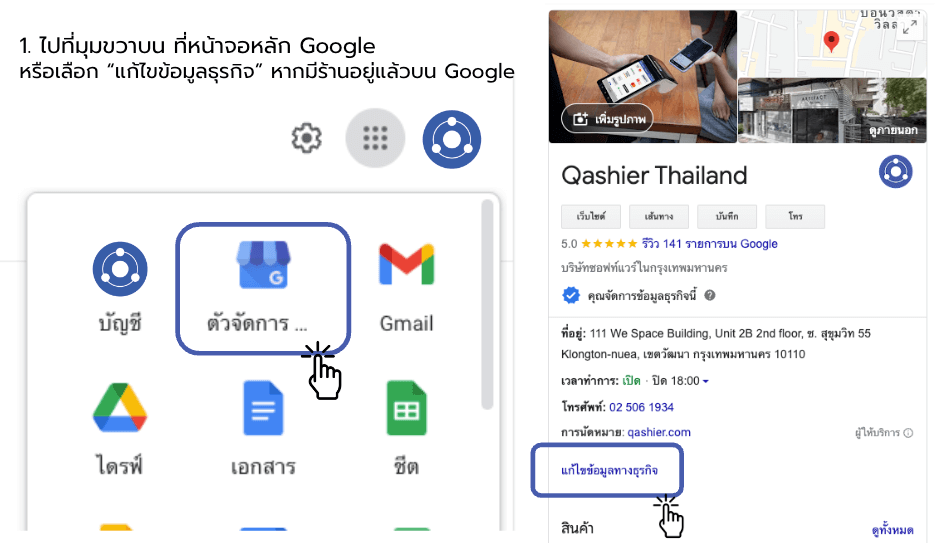
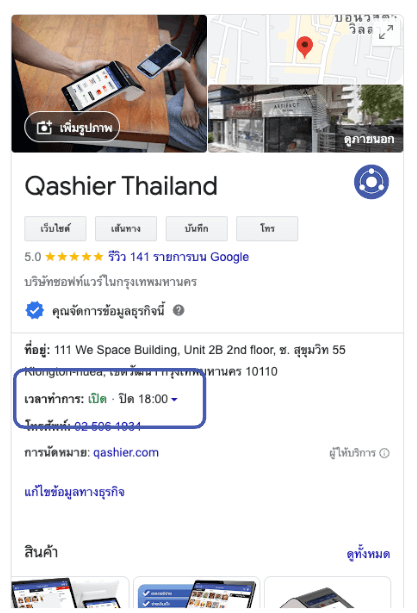
If your shop is already registered or showing up on Google, you can search for it and edit it there and then by tapping “Edit business information”.
2. Change your trading hours under the “Hours” menu
Once you are in your shop's settings, go to the Hours tab to start managing your opening and closing times and your holiday hours. For holidays that appear in Google's calendar, the system has already gathered the public holidays for you, which makes it a few minutes' work. And if your shop is closing on days beyond the official public holidays, or on dates the system does not show, you can adjust it yourself by adding a holiday or setting your opening and closing hours on Google as you wish.
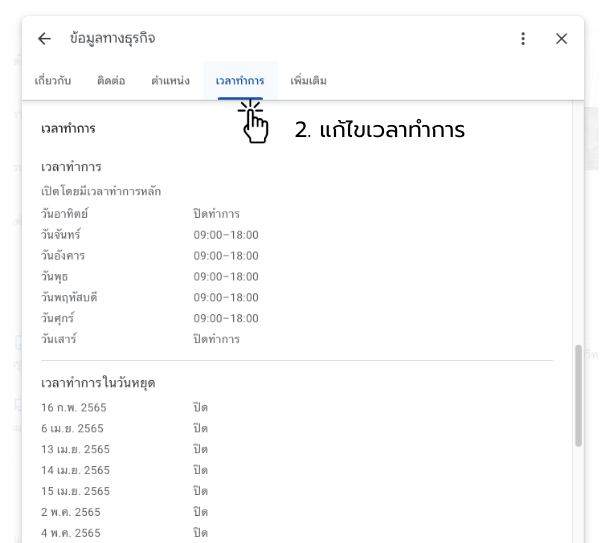
3. Edit and set your trading hours for each holiday
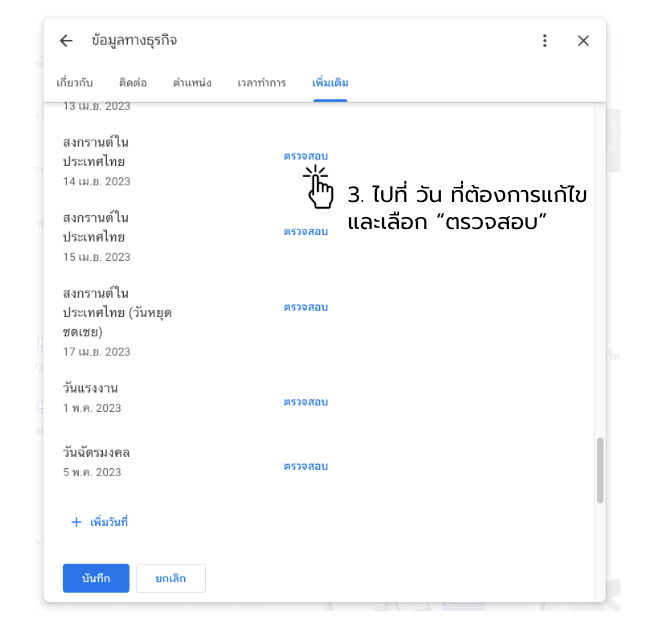
Once you have picked the holiday you want to change, you can review it and set the trading hours — the times you open and close — since your shop may well keep different hours than usual. All of it appears in Google search results straight away. You can also simply mark the shop as closed, and there is no need to worry when the day itself comes around, because you can set it all up in advance today. (See the example below.)
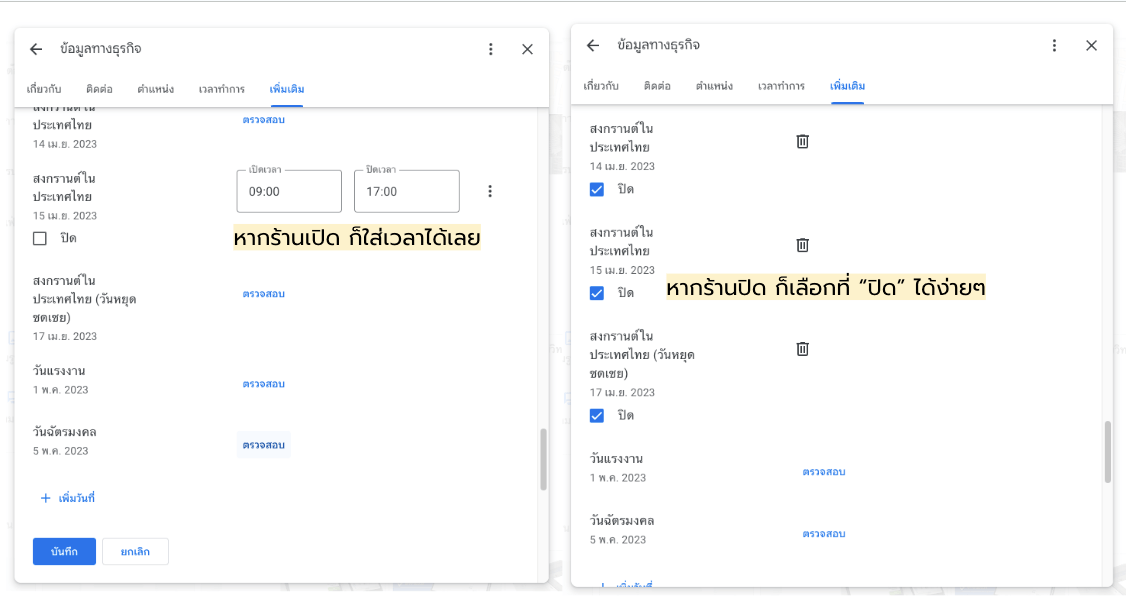
Done! Your shop's trading hours are now updated.
You can check the settings at any time, and every one of your trading hours will show up in the search results, so customers get the right information and nobody makes a wasted trip. Your shop does not lose out either, because customers will know you are open over Songkran.
Now that you know how to set your shop's opening and closing hours on Google and keep the shop in order online, do not forget how easy it is to run the real thing with Qashier POS — the smart shop management assistant from Singapore that helps you sell and run any kind of shop conveniently and quickly, cutting out unnecessary work so you can put your time into raising the quality of your products and your service instead.
About Qashier
Qashier provides POS hardware and software along with digital solutions for business: ordering at the table by QR code, table management for food and beverage businesses, staff management, loyalty programmes, inventory management, data analytics and cashless payments, all in a single device. It is easy to set up, with no hassle and no technical expertise required, and the screen is straightforward enough that anyone can use it. We also have a support team on hand seven days a week. For more details, contact us on Line Official: @qashier.th or call 02-544-0267